
Idle Farming Empire
FutureplaySimulation
4.319.12K Reviews
- Version
- 1.51.0
- Installs
- 10.00M
- Age Rating
- Everyone
Screenshots
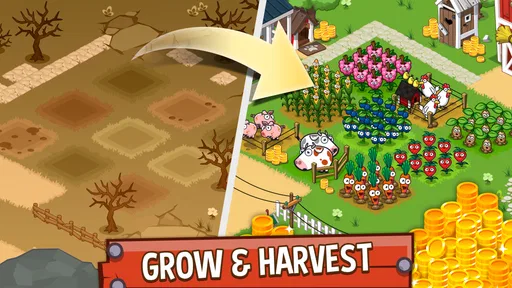
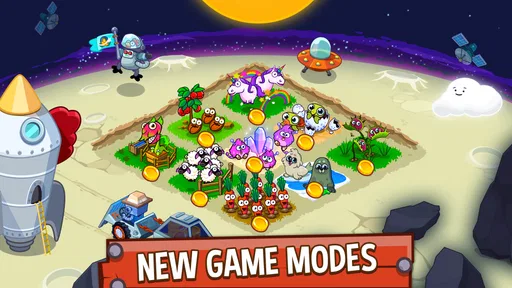
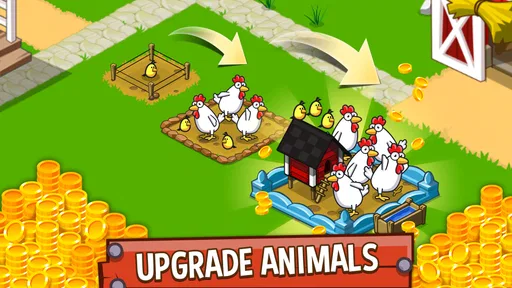


Our Review of Idle Farming Empire
 Analysis by Appyee
I approached Idle Farming Empire as a game for short, repeated visits rather than a farming title that demands constant attention. Developed by Futureplay, it sits in the simulation category and uses the familiar idle format: you build progress, check what has happened, make a few decisions, and leave again. That basic rhythm makes it easy to understand, but it also creates the main question I had while playing: do you enjoy watching a small operation grow through steady choices, or do you need a game with direct action every minute?
My answer is that this is a pleasant fit for players who like gradual progress and light management. It is free to start, rated for Everyone, and available for devices running Android 7.0 or later. The game has reached over 10 million installs, with a 4.3 average from around 352 thousand ratings, so it clearly appeals to a broad audience. Those numbers do not make it automatically right for everyone, though. The idle structure, optional purchases, and occasional setup friction matter more than popularity when deciding whether it belongs on your phone.
What makes the farming loop work
The appeal comes from turning a simple farm into a routine. Instead of expecting a long session, the game gives me reasons to return, inspect progress, and decide what deserves attention next. That makes it particularly comfortable during small gaps in the day: I can open it while waiting for an appointment, make a few upgrades, and close it without feeling that I have abandoned a complicated task.
Compared with a traditional farming simulation, the experience is less about manually performing every job and more about improving the system behind the farm. That distinction is important. If you want planting, movement, decoration, and hands-on control, a conventional farming game may feel richer. Here, the satisfaction comes from seeing earlier decisions continue to pay off while I am away.
The first place many players get stuck is not a difficult rule but the pace. Early progress can feel generous, then later decisions require more patience and better prioritization. I found it tempting to spend every available resource immediately because each upgrade gives an obvious sense of movement. A better approach is to pause briefly and ask which improvement will increase future progress rather than merely make the current screen look busier.
That small change in mindset is one of the most useful lessons in the game. Idle titles reward planning over frantic tapping. If I treated every button as an urgent instruction, the farm felt slower and more expensive to manage. When I treated each choice as part of a longer cycle, the same mechanics became calmer and more satisfying.
Where new players commonly lose momentum
The opening is approachable, but the game can still leave new players unsure about what deserves priority. The visual language suggests that progress is always available, yet not every available action has equal value. I recommend checking the full upgrade area before spending resources, even when one button is highlighted more strongly than the others. This takes only a moment and helps prevent impulsive choices.
Another common sticking point is expecting offline progress to feel identical to active play. It does not. Returning to collect progress is rewarding, but active sessions can feel more productive because decisions and collections happen immediately. Players who prefer a constant stream of interaction may interpret the pauses as a weakness. Players who want a game that respects their schedule are more likely to see them as the central benefit.
There is also a psychological trap in idle farming games: a small reward can make me reopen the app repeatedly without a clear purpose. I get more enjoyment when I decide what I am checking before launching it. For example, I might open the game to collect accumulated progress, review the next meaningful improvement, and leave once that decision is made. That keeps the game relaxing instead of turning it into a repetitive habit.
Setup checks before blaming the game
Because this is a mobile game built around returning to an ongoing farm, a smooth start depends on ordinary device checks. I would first confirm that the phone meets the minimum Android requirement of version 7.0. If the operating system is older, installation or stability problems are more likely to come from compatibility than from the game itself.
I would also make sure the installation has finished completely and that the device has enough free storage for normal app operation. A nearly full phone can behave unpredictably, especially when several applications are competing for space. Closing other demanding apps before the first launch is a simple way to reduce avoidable slowdowns.
When progress seems not to update, I would avoid immediately reinstalling. First, I would close and reopen the game, check whether the device has a stable connection, and allow the opening screen enough time to finish loading. Reinstalling is a disruptive step for any progress-based game, so it should come after less destructive checks rather than before them.
The same caution applies to updates. The current version is 1.51.0, and keeping the installed version current is sensible when a problem appears after a device or operating-system change. An update may resolve compatibility issues, but I would still avoid assuming that every pause, delay, or unexpected result is a bug. Idle progression can naturally feel uneven, especially when the next goal is more demanding than the last.
For iPhone and iPad users, the practical questions are similar even though the operating-system requirement listed here is Android-specific. Install from the official store for the device, keep the system reasonably current, and avoid interrupting the initial setup. The important point is not to treat a failed first launch as proof that the game is universally broken. Device condition, network behavior, and unfinished installation can all produce similar symptoms.
Recovering a disrupted workflow
My preferred recovery method is deliberately conservative. If the farm appears frozen or a reward does not show immediately, I wait a little, leave the screen, and reopen the game. I then check whether the previous action actually completed before tapping the same control repeatedly. Repeated taps can make it harder to understand what happened and may create the impression that progress has been lost when the interface is simply catching up.
If the problem continues, I restart the device and try again before changing anything more serious. This is not glamorous advice, but it is often more useful than deleting the application. A restart clears temporary device-level issues without putting local progress at unnecessary risk.
I would be especially careful with clearing app data or reinstalling. Those actions can remove locally stored information in some games, and an idle title is particularly sensitive to that possibility because its value is built over time. Before taking such a step, I would look for the game’s own account or recovery options and make sure I understand how progress is preserved. If the game is already working, I would not experiment with storage settings simply to test a theory.
Purchases deserve the same restraint. The game is free, but it includes in-app purchases ranging from $0.99 to $109.99 per item. That wide range means I would treat every purchase as optional and review the checkout screen carefully. I would not buy something merely because progress feels slow for one session. Waiting, returning later, and deciding whether the purchase solves a genuine preference problem is a better habit than using money to remove temporary impatience.
A useful workflow is to play without spending first. That lets me learn whether I actually enjoy the idle loop, how quickly I return to it, and whether the pacing suits me. Only after that trial would I consider an optional purchase, and even then I would set a personal limit before opening the store. This is particularly important for younger players, since the Everyone rating describes the content audience, not a guarantee that every purchase decision will be sensible without supervision.
When the app may not be the cause
Not every missing update points to a game error. If the phone is in a power-saving mode, background activity may be restricted. If the device clock is incorrect, time-based behavior in an idle game may appear unusual. I would correct the system time, disable unusually aggressive battery restrictions for testing, and then reopen the game before drawing conclusions.
Network changes can also confuse diagnosis. A weak connection may affect loading or store-related actions while the core game remains installed correctly. Testing once on a reliable connection, rather than repeatedly switching between unstable networks, gives a clearer answer. I would also distinguish between a slow screen and lost progress: the first may resolve after a restart, while the second deserves more caution before any reinstall.
Storage pressure is another overlooked cause. A phone that is constantly full can make updates fail, close apps, or delay normal writing of temporary files. Freeing space and restarting the device is a safer first response than deleting the game. If other applications show similar symptoms, that is a strong sign that the wider device environment deserves attention.
Notifications and background behavior can be misleading as well. Not seeing a reminder does not necessarily mean that the farm stopped progressing. Notifications may be disabled, delayed, or filtered by the operating system. I judge the game by what appears after opening it, not by whether every expected alert arrives at the exact moment I imagine.
These checks also help answer a practical question: is the game suitable for an older phone? The minimum Android version is 7.0, but operating-system compatibility is only the starting point. A device can meet that requirement and still struggle if it has very little free storage, an aging battery, or many background apps. On a modest phone, I would keep expectations realistic and close unnecessary applications before playing.
How it compares with other farming choices
The usual alternatives fall into two broad groups. Traditional farming simulations give me more direct control and often make each task feel physical: I perform an action, watch it happen, and move to the next one. Idle Farming Empire is better when I want the farm to keep its sense of continuity without requiring a full session. It is less suitable if the pleasure comes from personally carrying out every stage of production.
Compared with management games that focus heavily on menus, this title is easier to approach because its central idea is visible quickly. However, that simplicity can become a limitation for players who want deep economic planning, detailed customization, or a large number of interlocking systems. I would choose a more complex management simulator when I want a project that demands sustained attention and careful long-term accounting.
It also differs from competitive mobile games. There is less pressure to react to another person in real time, which makes it a calmer choice for breaks and evening play. On the other hand, players who need competition, social coordination, or a strong narrative may find the farm too solitary. The game’s strength is its repeatable personal routine, not dramatic urgency.
Who will enjoy it, and who should skip it
I recommend it to players who like incremental progress, short check-ins, and decisions that remain understandable even when the game is played casually. It is also a good match for someone who wants a simulation flavor without learning a dense set of controls. The Everyone content rating makes it broadly approachable from a content perspective, although adults should still manage purchase settings for shared devices.
I would hesitate to recommend it to anyone who dislikes waiting, repeated collection cycles, or monetization in free games. If you want every minute to be filled with meaningful manual activity, the idle structure may feel empty. If you prefer to pay once and remove all optional spending considerations, the free-to-start model may not match your expectations.
My most practical recommendation is to install it when you want a low-pressure side game, not when you are searching for a complete replacement for a deep farming simulator. Give it enough time to reveal its rhythm, but do not force yourself to return constantly. The game is at its best when it fits around your day rather than organizing your day around it.
Final thoughts after settling into the routine
Futureplay has made a simulation game that understands the appeal of small progress. I like that I can make a few choices, leave, and return without needing to reconstruct a complicated plan. The trade-off is that the same structure can expose its limits quickly: waiting becomes part of the experience, and optional purchases may look tempting when progress slows.
The best way to approach it is with clear boundaries. Check the next useful improvement before spending, test the game without paying, and use conservative troubleshooting if loading or progress looks unusual. Those habits make the experience easier to judge and reduce the chance of confusing a device problem with a game problem.
With a 4.3 average and more than 10 million installs, it has clearly found an audience, but my recommendation is based less on those figures than on the kind of player it serves. This is a gentle idle farming game, not a hands-on agricultural simulator. If that distinction sounds appealing, the free entry point makes it easy to try. If you need constant action, deep control, or no purchase prompts, another farming style will probably serve you better.
Verdict
Strengths of Idle Farming Empire
- Simple idle mechanics make progress easy to understand.
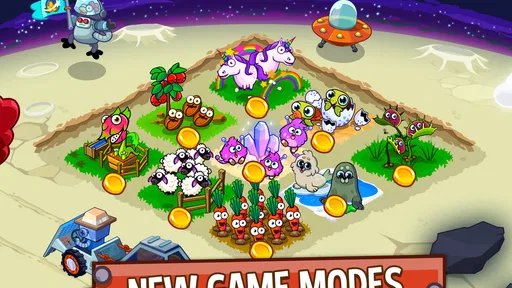
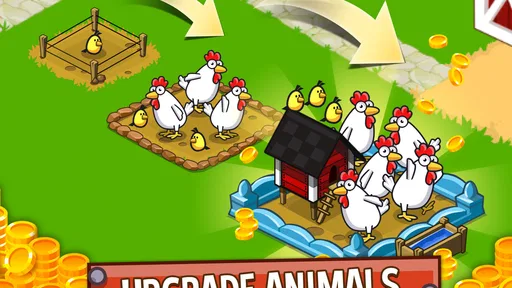
- Many crops, animals, and upgrades provide variety.
- Offline earnings let your farm grow while you are away.
- Bright cartoon visuals are friendly and appealing.
- Short play sessions work well for casual mobile gaming.
Limitations of Idle Farming Empire
- Progress can slow noticeably without frequent upgrades.
- Ads may be needed to maximize rewards and speed growth.
- Some upgrades and boosts encourage in-app purchases.
- Gameplay can become repetitive after extended sessions.
- An internet connection may be required for certain rewards.
Other Releases by Futureplay
View All
Merge Gardens
Puzzle4.3
Similar Picks in This Category
View All
Truckers of Europe 3
Wanda Software4.3

Town Building Life Simulator
XGame Global4.2

Fidget Toys Trading・Pop It 3D
Freeplay Inc4.7

Sculpt People
CrazyLabs LTD4.4

Scary Teacher 3D
Z & K Games4.2

Hair Tattoo: Barber Shop Game
CASUAL AZUR GAMES4.3
Frequently Asked Questions
What is Idle Farming Empire?
Idle Farming Empire is a casual idle-management game in which you build and expand a virtual farm. You grow crops, collect resources, unlock new areas, and improve production through upgrades. Much of the progress continues automatically, even when you are not actively playing, making it suitable for short sessions as well as longer play periods.
How does progression work when I am not playing?
The game is designed around automated production. Once your fields, workers, and farm systems are upgraded, they continue generating income while you are away. When you return, you can collect accumulated rewards and reinvest them in faster production, additional crops, and new features. However, some rewards and bonuses may require you to open the game or watch optional advertisements.
Is Idle Farming Empire free to download and play?
Idle Farming Empire can generally be downloaded and played for free, but it may include optional in-app purchases. These purchases can provide premium currency, boosters, special bundles, or faster progress. You do not normally need to spend money to experience the core farming systems, although free players may need more time and patience to reach certain upgrades or events.
Does the game require an internet connection?
The basic farming and idle mechanics may work during some offline periods, allowing you to make progress without being constantly connected. Nevertheless, an internet connection can be necessary for advertisements, cloud-related features, updates, special events, and verifying purchases. Availability of offline rewards and certain features may also vary depending on the version and device.
Is Idle Farming Empire suitable for children and casual players?
The game is easy to understand because its main activities involve tapping, collecting earnings, upgrading production, and unlocking farm areas. It can be enjoyable for casual players who prefer relaxed, repetitive progression rather than complex strategy. Parents should still review the app’s age rating, advertising content, and in-app purchase settings before allowing children to play.
Play our best games!


